Page 1 of 1
Object Textures: Deluxe Ducks
Posted: Sat Mar 15, 2014 4:58 am
by MyNameIsKooky
Why have normal ducks when you can have DELUXE DUCKS?!
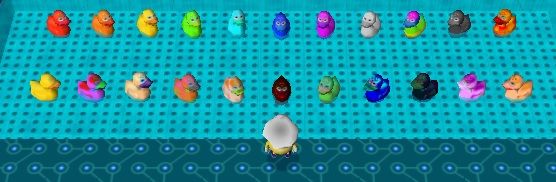
To install these textures, place the images inside the "Custom" folder that's located in the same directory as the player executable. If this folder doesn't exist, create it!
Posted: Sat Mar 15, 2014 4:59 am
by StinkerSquad01
So deluxe! High-end! VIP exclusive!
Posted: Sat Mar 15, 2014 5:11 am
by Koopson44
StinkerSquad01 wrote:So deluxe! High-end! VIP exclusive!
And twice as expensive! That's how you know how it's high quality.
Posted: Sat Mar 15, 2014 7:10 am
by Master Wonder Mage
Koopson44 wrote:StinkerSquad01 wrote:So deluxe! High-end! VIP exclusive!
And twice as expensive! That's how you know how it's high quality.
Worry not! All proceeds go direct to Duckoids Incorporated!
Re: Object Textures: Deluxe Ducks
Posted: Sat Mar 15, 2014 9:10 am
by yot yot5
MyNameIsKooky wrote:To install these textures, place the images inside the "Custom" folder that's located in the same directory as the player executable. If this folder doesn't exist, create it!
Whoa, whoa, whoa, hold on! I thought we installed all our new textures into the "Objecttextures" folder!
Re: Object Textures: Deluxe Ducks
Posted: Sat Mar 15, 2014 10:11 am
by Master Wonder Mage
yot yot5 wrote:MyNameIsKooky wrote:To install these textures, place the images inside the "Custom" folder that's located in the same directory as the player executable. If this folder doesn't exist, create it!
Whoa, whoa, whoa, hold on! I thought we installed all our new textures into the "Objecttextures" folder!
You can only put jpegs in the objecttextures folder. We like .bmps. Therefore we are still using custom.
Re: Object Textures: Deluxe Ducks
Posted: Sat Mar 15, 2014 11:11 am
by yot yot5
Master Wonder Mage wrote:yot yot5 wrote:MyNameIsKooky wrote:To install these textures, place the images inside the "Custom" folder that's located in the same directory as the player executable. If this folder doesn't exist, create it!
Whoa, whoa, whoa, hold on! I thought we installed all our new textures into the "Objecttextures" folder!
You can only put jpegs in the objecttextures folder. We like .bmps. Therefore we are still using custom.
Ah, right. Thanks.

Posted: Sat Mar 15, 2014 12:34 pm
by jdl
Aren't you able to retain the quality of a .bmp by manually changing the file extension to .jpg? It's what I've been doing with MOPI.
Having multiple object texture folders like this kinda clutters everything up, especially now that the feature is officially supported.

EDIT: Wow, I wrote that when I just got up and didn't word things correctly. Sorry if I came off as rude.

Posted: Sat Mar 15, 2014 5:06 pm
by StinkerSquad01
jdl wrote:Aren't you able to retain the quality of a .bmp by manually changing the file extension to .jpg? It's what I've been doing with MOPI.
I'm pretty .jpeg files create nasty ugly hideous disgraceful artifacts no matter what.
Re: Object Textures: Deluxe Ducks
Posted: Sat Mar 15, 2014 5:07 pm
by Sammy_P
MyNameIsKooky wrote:Why have normal ducks when you can have DELUXE DUCKS?!
To install these textures, place the images inside the "Custom" folder that's located in the same directory as the player executable. If this folder doesn't exist, create it!
ducks
these are good
Posted: Sat Mar 15, 2014 5:41 pm
by MyNameIsKooky
jdl wrote:Having multiple object texture folders like this kinda clutters everything up, especially now that the feature is officially supported.
During WA1E, pretty much all custom object textures were put into that "Custom" folder. Aside from one additional folder, there's really no additional clutter.
I tried using the objecttextures folder myself, but the game often froze or just didn't work at all. Frankly, I prefer the "Custom" folder method. So I'm still going to use that, and I'm sure many other adventure designers will as well. Right now the official feature is far too clunky in my opinion.
Posted: Sat Mar 15, 2014 7:32 pm
by jdl
MyNameIsKooky wrote:I tried using the objecttextures folder myself, but the game often froze or just didn't work at all.
Wow really?

I've been testing a lot of my levels I'm working on that have objects with custom textures and haven't experienced any issues.
Anyways after looking back at my Editor v0.96, I see now that it's not as cluttered as I thought it was, I think that I was just thinking about my Adventures\Current\ folder being filled with so much stuff.
 I can't think straight in the morning.
Also, the ducks are very nice!

Posted: Sun Mar 16, 2014 7:30 am
by Qloof234
MyNameIsKooky wrote:Frankly, I prefer the "Custom" folder method.
Cool, I thought I was the only one. In my case it's less out of "it's not working" (admittedly I haven't even tried the new one yet) and more out of "I do not have the patience to go back through >100 .wlv files and change every single texture-search from Custom/ to the new one".

Posted: Wed Aug 19, 2015 1:50 pm
by Edwin Chung
I am sorry,but I really couldn't play your game.
I don't know whether it is related to the deluxe ducks(the error shown is not found duck.bmp)
But,would you mind to show me the procedures to down these deluxe ducks with pictures?I really cannot understand,sorry.
Posted: Thu Aug 20, 2015 12:56 am
by MyNameIsKooky
Yes, you will need Deluxe Ducks installed to your Wonderland Adventures Editor to play certain adventures - that's why the error appeared.
First, you must download the textures by clicking the "Download" button in the first post of this topic.

Create a folder called "Custom" in the root editor directory as shown in the picture below. That is the folder where you will put all of the duck.bmp files.

Unzip the file you downloaded and place all of the .bmp files into the Custom folder. The contents of the Custom folder should look something like this:

Once that is done, the error should be fixed and you'll be good to go.
Posted: Thu Aug 20, 2015 10:47 am
by Edwin Chung
thank you very much.I can now play
